Once-off licence
Launch weekUS$19once off
Pay once for your Windows licence and use Atlas on up to two PCs.
Once-off · Regular price US$29
 ATLAS UI
Use your verified account email at checkout. After payment, open My Account for your licence, billing and Windows downloads.
ATLAS UI · WINDOWS EDITION
Choose your licence. Both options include the same Windows app and official updates while we maintain Atlas.
Version 1.0.6 · Windows x64 AI and optional voice services are billed separately.
Free official updates for as long as we maintain Atlas. Open the update notification in Atlas, or download the update from My Account.
After you connect your AI on first start, a guided tour begins. Explore the interface, discover its features and what you can do, with Atlas guiding you all the way. Finish with a setup checklist to help you connect and personalise everything.
ATLAS / INTERACTIVE PREVIEW WINDOWS EDITION
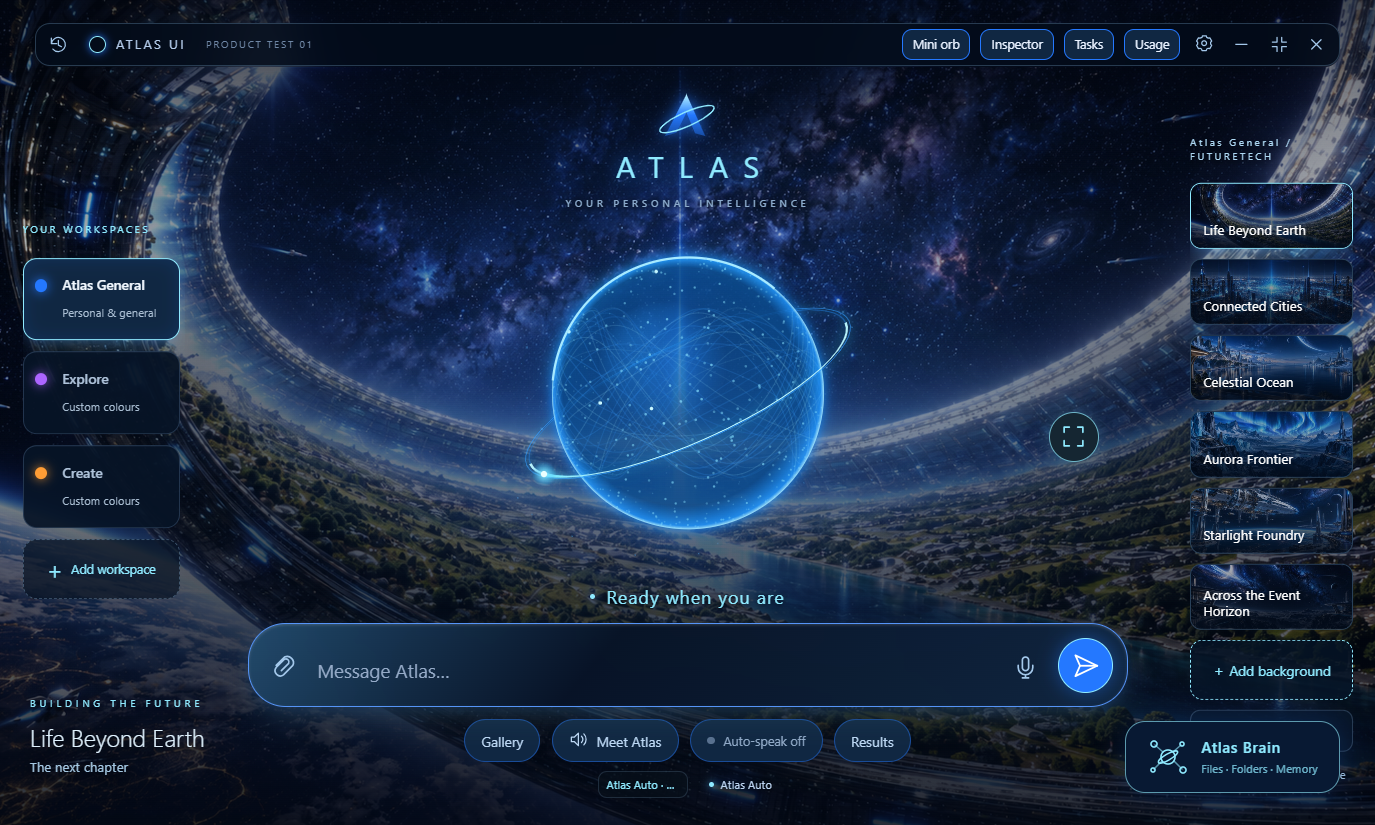
INSIDE ATLAS
Try a different workspaceClick the cards in Atlas, or choose below.
Atlas General · Life Beyond Earth. Workspace switching is enabled in this preview.
US$19 · LAUNCH WEEK
One purchase. Yours to make your own.
THE WORK BEHIND YOUR ATLAS
Building your own assistant starts with an idea. Making it work as an everyday desktop interface takes revisions, testing and attention to the details. With Atlas, that groundwork is already part of your purchase.
Repeated automated checks across 95 saved test runs, helping catch regressions as Atlas developed.
Repeated across Product Test updates, with 656 automated behaviour checks in one recorded suite.
Early Atlas builds, Product Test updates and beta installers that shaped the product.
Estimated effort for a comparable AI-assisted build, including testing and refinement.
Check executions include repeated tests across development runs. Build hours are estimated.
28,000+ automated check executions. A review of retained logs on 24 October 2026 identified 28,053 executions across 95 recorded app test runs: 25,981 for Product Atlas Test and its installer, and 2,072 for earlier Atlas development. Copied results and website/payment tests were excluded. This is a documented subset, not an exhaustive lifetime total. Of these historical executions, 27,897 passed and 156 failed during development; this is not a count of distinct bugs or current unresolved issues.
656 automated behaviour checks. One recorded complete passing suite contains 656 checks. These are included within the execution total above; the two figures should not be added together. Repeated executions are not additional unique behaviours.
134 versions of Atlas. Distinct recorded version identifiers across the Atlas development history: 75 earlier Atlas versions, 54 Product Test versions and 5 beta installer versions. These include internal development builds, not 134 public releases or 134 separate features.
560+ hours · build estimate. A planning estimate for a comparable AI-assisted build, using a 560-hour scope allocation: 80 hours for interface design, 120 for workspaces and knowledge, 80 for AI and voice, 160 for tools and creative workflows, and 120 for installation and refinement. It is not measured Atlas working time, a verified minimum or a guaranteed time saving. Experience, reuse and project scope can make the effort lower or higher.
Testing scope. Historical automated runs include simulated provider replies. The figures do not mean every check used a live service or that the app is free of defects. Website Studio remains Beta.
THE COMPLETE WINDOWS EDITION
WE KEEP BUILDING ATLAS. YOU KEEP BUILDING YOUR WORLD.
Both licences include official Windows updates while we maintain Atlas. With Atlas Monthly, access continues through each paid period.
Atlas lets you know in the app.
Open Help and advanced in Settings.
Restart Atlas when prompted.
Updates are free while we maintain Atlas; there is no fixed release schedule or guarantee of particular new features. Connected AI and optional voice services retain their own terms and charges.
Read the licence and update policyFROM DOWNLOAD TO YOUR FIRST IDEA
No ZIP folders to unpack. Start with the Windows installer and follow the setup inside Atlas.
After verified payment, receive your licence and private download access.
Run the installer and enter your licence. A desktop shortcut is selected by default.
Sign in to ChatGPT or choose DeepSeek. You can connect both; optional voice setup comes next.
The tutorial introduces Atlas. Add your own files, choose a background and start with a fresh workspace.
The launch installer targets 64-bit Windows. An internet connection and a supported AI connection are needed for online AI features. Mac and mobile installers are not part of this Windows purchase.
A FEW THINGS TO KNOW
The interface is yours to personalise.
Your connections determine what it can do.
Atlas is a Windows desktop interface for your connected AI. It brings workspaces, files and supported tools together. It does not include an unlimited AI subscription, and it is independent of OpenAI, DeepSeek and ElevenLabs.
No. You can start with either supported connection. Their capabilities differ. GPT-specific tools need ChatGPT and their relevant setup; DeepSeek uses your own API key. With multiple providers connected, Atlas Auto can route supported requests.
Yes. Use your connected AI to plan, draft, code and refine your own work. Atlas gives those activities a workspace. Generated output still needs your review and is subject to the relevant provider terms. This is different from modifying or redistributing the Atlas application itself.
Yes. All official updates for your Atlas Windows edition are included at no additional Atlas charge for as long as we maintain Atlas. There is no extra charge for updates. Atlas Monthly renews until cancelled. Release timing and particular new features are not guaranteed; your connected AI and voice services have their own terms and costs.
Open Settings, then Help and advanced. Read the release notes, choose Download and install, and restart Atlas when prompted. You can dismiss the notification and return later. If you use an earlier version, get the latest Windows installer or update from My Account.
The Windows edition described at purchase, plus all official updates for that edition at no extra charge for as long as we maintain Atlas. The launch-week price is US$19, compared with the regular US$29 price, from 26 October 2026 at 09:00 until 3 November 2026 at 23:59 South Africa time. Existing waitlist and expo customers can use this launch-week offer. Contact us with your supplied offer instructions if you need help. The final payable ZAR amount is shown before payment.
New installations start with the supplied defaults and your own fresh profile. Your private memories, files and provider connections are added by you.
Website Studio is a Beta feature for creating and revising static website previews. Check generated code and content before relying on it. Public hosting and client-review sharing are not included in this release.
YOUR NEXT CHAPTER
Choose Atlas Monthly at US$7/month or the US$19 once-off launch offer.